
Learn About Your Cash Flow Forecast
Every nonprofit leader asks some version of the same question: will we have enough cash to get through the next few months? The Cash Flow Forecast is built to answer that. It's an AI-assisted report that projects your cash balance month by month for the next year, based on how cash has actually moved through your organization, so you can spot a potential cash flow issues that might be on the horizon.
The Cash Flow Forecast is AI-assisted. Your proprietary data stays completely private and AI models are never trained on or fine-tuned using your information. The projection is an estimate, not a guarantee, so review the assumptions and notes below before relying on it.
What can the Cash Flow Forecast tell me?
The Cash Flow Forecast projects your cash balance for each of the next 12 months. Behind the scenes, MonkeyPod's AI reads your cash history to infer a set of assumptions (your typical monthly inflow and outflow, whether either is trending up or down, and whether certain months tend to run higher or lower than others). Those assumptions then feed into a straightforward (non-AI) calculation that produces the actual month-by-month numbers (ie., the math itself is never left up to the AI).
The forecast is built on your cash accounts: your bank accounts and undeposited funds. Moving money between those accounts (like depositing undeposited funds into your bank) doesn't count as new cash flow, since it isn't new cash coming in or going out.
Recorded recurring transactions and open pledge or grant receivables are treated as known commitments and layered on top of the historical trend. Open invoices and bills aren't factored in currently, so the forecast leans most heavily on your organization's actual track record of cash moving in and out.
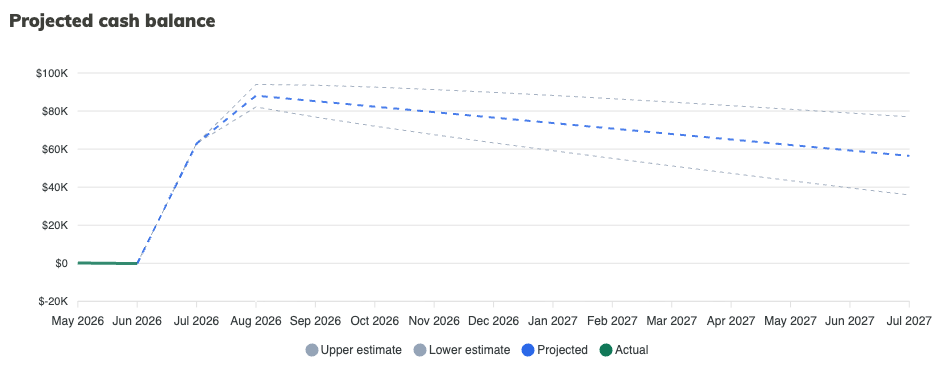
Because every organization's history is different, MonkeyPod also gives you a Confidence rating and an uncertainty range (shown as an Upper Estimate and Lower Estimate on the chart) so you know how much weight to put on the numbers. The less history your organization has, the wider that range will be.
Where can I find the Cash Flow Forecast in my MonkeyPod?
Choose Reports > Operations > Cash Flow Forecast from the main menu.
How do I generate a forecast?
If you have not previously generated a forecast for your organization, you'll see a Generate Forecast button on the Cash Flow Forecast page. Select that to get started.
Before it runs, MonkeyPod gives you a chance to add anything relevant that your books don't already show, using the Add context field.
For example, say Meadowbrook Youth Center knows a $50,000 state grant is coming in every August for the next three years, but that commitment isn't recorded anywhere in their MonkeyPod yet. Typing a note like "We expect about $50,000 from a state grant every August for the next 3 years" into the Add context field lets the AI factor that in, rather than relying only on what's already in the books.
Generating a forecast usually takes a minute or two. You can leave the page and come back; it'll be ready when you return.
Once a forecast has been run, you'll see a Regenerate button toward the top of the page and an Add Content button at the top of the report. Use either to kick off an updated report and add additional content for consideration, as necessary.

How do I read the results?
At the top of the report, four figures give you the headline view:
- Cash today: your current balance across Bank accounts and Undeposited Funds.
- Projected in 12 months: where that balance is expected to land a year out.
- History available: how many months of cash history MonkeyPod had to work with, along with a badge noting whether that history is limited.
- Confidence: how much weight to put on the forecast overall. The less history and the more volatile your cash flow has been, the lower this rating will be.

Below that, the Report tab breaks the forecast down in detail:
- Executive Summary: a plain-language readout of what's driving the forecast, including any important caveats about data quality.
-
Projected cash balance chart: your projected balance over the next 12 months, plotted alongside an Upper estimate and Lower estimate to show the range of likely outcomes.
-
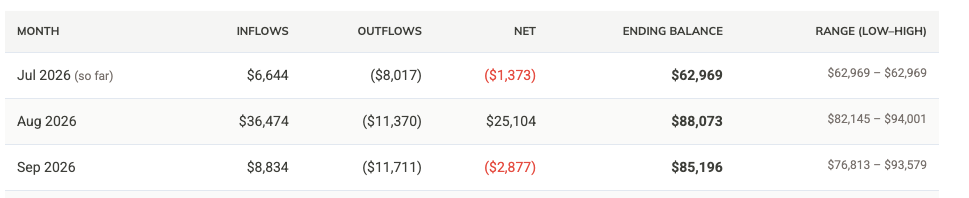
Monthly table: Inflows, Outflows, Net change, Ending Balance, and a Range (Low-High) for every month in the forecast window.
- Assumptions: the baseline monthly inflow and outflow the AI inferred from your history, plus any annual growth trend it detected. These are marked Inferred since the AI reads them from your data rather than you setting them directly.
- Seasonality: a pair of charts showing how each calendar month compares to your average, for both inflows and outflows.
- Excluded one-offs: unusual amounts the AI stripped out of your baseline so a single unusual month doesn't distort the whole projection, along with an explanation of why each one was excluded.
- Notes: additional context worth knowing, such as gaps in your recorded recurring transactions or unusually large single-month activity.
- Historical monthly cash flow: the actual Inflows, Outflows, Net, and Ending Cash for each month of history MonkeyPod used to build the forecast, so you can see exactly what the projection is based on.
How accurate is this, and what affects my Confidence rating?
The Cash Flow Forecast is an estimate, not a guarantee. Confidence depends heavily on how much cash history your organization has and how consistent that history has been. An organization with only a few months on the books, or with cash flow that's swung widely from month to month, will see a lower Confidence rating and a wider Range on the chart and monthly table. As more history accumulates and your recurring transactions are kept up to date, both the confidence rating and the accuracy of the projection should improve.
The Notes section is worth reading closely for this reason. If MonkeyPod flags that your recurring transaction schedule looks empty, that's usually worth fixing: recording standing costs like payroll, rent, or recurring grants gives the forecast real commitments to build on instead of guesses based purely on past averages.
Can I refine the forecast with information MonkeyPod doesn't know about?
Yes. Click Add Context (available above the report) at any time to tell the AI about a planned expense, an upcoming grant, or anything else your books don't yet reflect, then click Regenerate to produce a new forecast that takes it into account.

Can I save or share my forecast?
Click Email PDF (above the report) to email yourself a PDF copy of the forecast.
Frequently Asked Questions
Why is my Confidence rating Low?
Confidence is driven primarily by how much cash history your organization has, and how consistent that history has been. New organizations, or those with only a few months of activity, will see a lower rating and a wider estimate range until more history builds up.
What counts as "cash" in this forecast?
Your Bank accounts and Undeposited Funds. Transfers between those accounts (like depositing undeposited funds) aren't counted as new cash flow, since the cash was already there.
Does the forecast include my open invoices and bills?
Not yet. The forecast currently factors in recorded recurring transactions and open pledge or grant receivables, but relies on historical trends rather than open invoices and bills.
Can I edit one of the Assumptions directly, like the baseline monthly inflow?
Not directly. Assumptions are inferred by the AI from your cash history. If you have information that should change one of them (like a known future grant or a planned expense), add it through Add Context and regenerate the forecast rather than editing the figure itself.
How is this different from the Burn Rate report?
Burn Rate looks backward: it calculates your average monthly burn over a lookback window and, if you're spending down cash, estimates your runway. The Cash Flow Forecast looks forward, projecting a full 12 months of month-by-month inflows, outflows, and ending balances using AI-assisted trend and seasonality analysis.