
Learn About Credit Memos
A credit memo is used to provide a credit to one of your donors or customers, which can then be applied to an open invoice or pledge, or saved to apply toward a future invoice or pledge.
Credit memos live on the receivables side of your books: they represent money you're crediting to someone.
When to use a credit memo
A few common scenarios call for a credit memo:
- Uncollectible pledge: A donor can't fulfill all or part of a pledge, and the pledge itself can't be edited because it was recorded in a closed fiscal year
- Discount or promotional credit: You want to reduce an invoice balance for a customer
- Overpayment or billing correction: A donor or customer was charged incorrectly and you need to issue a credit rather than a refund
- Future credit: You want to record a credit now and let the donor or customer apply it to a pledge or invoice down the road
Example: donor pledged $5,000 to your capital campaign in 2024, and that fiscal year is now closed. In 2026, the donor lets you know they can only pay $3,000 of it. Since the original pledge can't be edited, you create a credit memo for the remaining $2,000 and apply it to the pledge. This reduces what's still owed without reopening or changing your 2024 books.
Understanding the accounting behind credit memos
A credit memo follows standard double-entry accounting, just in reverse of the transaction it's offsetting. When you record a credit memo, your MonkeyPod debits the offsetting account you chose (typically reducing income, or recording an expense) and credits your receivable account, lowering the amount still owed on that relationship's books.
This mirrors the original pledge or invoice entry, which debited Accounts Receivable and credited income when it was recorded. The credit memo effectively unwinds part or all of that original entry's receivable balance, without touching the original transaction.
Because the receivable account on the credit memo needs to match the one used on the original pledge or invoice, it's worth double-checking that field before saving, especially if your organization uses more than one receivable account.
How to record a credit memo
You can record a credit memo from the action menu on a donor 's or customer's relationship page.
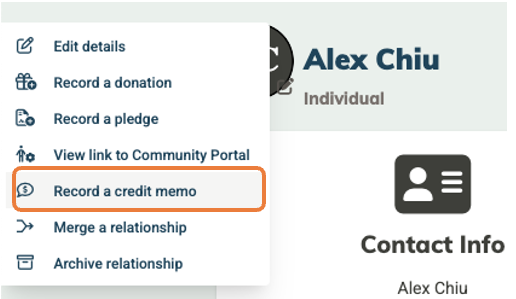
Choose Record a credit memo and you'll see a form with the following fields:
- Amount to Credit: the dollar amount you're crediting
- Date: the transaction date, defaulted to today
- Receivable Account: defaults to Accounts Receivable, and should match the account used on the original pledge or invoice
- Offsetting Account: usually an income account, though this may be an expense account if the credit reflects a discount or promotional expense
- Apply to Open Invoice (Optional): only appears for relationships that have open invoices. This option lets you link the credit memo directly to a specific open invoice as you create it; if you leave this blank, you can still apply it manually later.
- Notes: a good place to record why the credit memo is being issued
Click Save, or select Save & View to jump straight to the credit memo's page.
How to apply a credit memo
Once a credit memo is recorded, you can apply all or part of its balance to an outstanding pledge or invoice:
- To an invoice, at the time you record the credit memo: Use the "Apply to Open Invoice" field on the credit memo form itself.
- To a recorded pledge or invoice: Look for the Payments Received tab at the bottom of the pledge or invoice page. This tab shows an Available to apply panel listing all of a relationship's unapplied credit memos, each with an amount field and an Apply button. Enter the amount and click Apply.
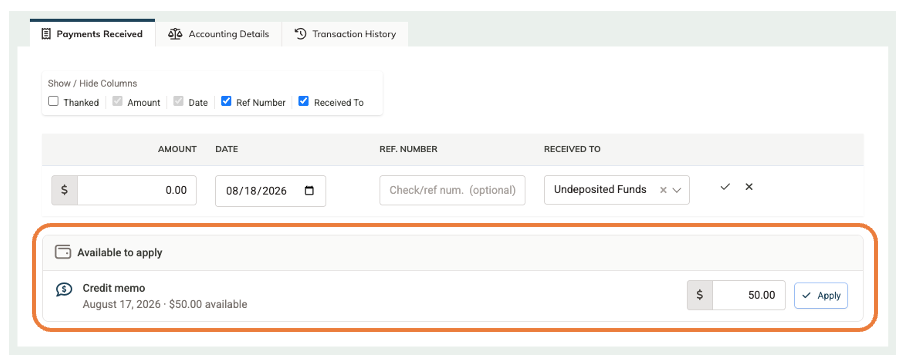
Partial amounts are always allowed. You can apply less than the full credit memo balance and leave the remainder available for later.
Good to Know: A credit memo and its application are dated in your current open period, so the effect hits today's books, not a prior closed year. A closed-year pledge balance is never restated—only the amount still outstanding is reduced going forward.
How to remove an applied credit memo
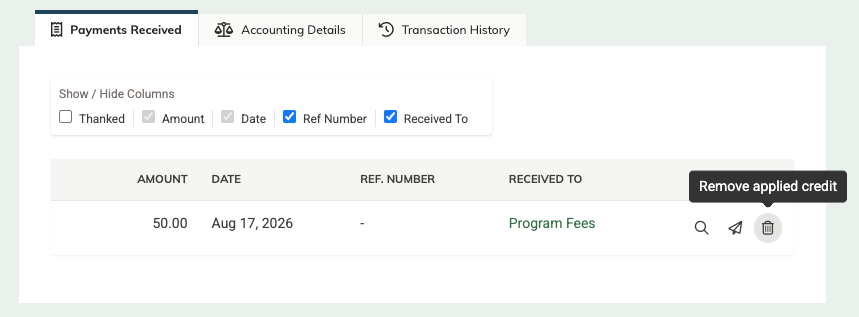
If you need to undo an application, click the trash icon on the payment row in the Payments Received tab. This removes only the application, not the credit memo itself, so its remaining balance becomes available to apply again.
Frequently Asked Questions
How is a credit memo different from a vendor credit?
They're mirror images of each other. A credit memo is a credit you issue to a donor or customer, reducing what they owe you on the receivables side of your books. A vendor credit is the opposite: a credit a vendor owes you, which you apply against a future bill on the payables side. See How to Record & Apply Vendor Credits for that side of the process.
Can I issue a credit memo without applying it to anything?
Yes. A credit memo is saved to the relationship as soon as you record it, and it stays available to apply toward a pledge or invoice whenever you or the donor are ready.
Does a credit memo generate a refund to the donor?
No. A credit memo doesn't move money. It only reduces a balance owed. If you need to send money back to a donor, that's a separate refund process.
Can I apply one credit memo across multiple pledges or invoices?
Yes, as long as the credit memo has a remaining balance available. You can apply portions of it to more than one pledge or invoice over time.
I don't see the option to create a credit memo for a specific relationship—why not?
A relationship must have the role of Customer, Donor, or Vendor in order for the Record a credit memo option to appear in the action menu. Recording or applying a credit memo also requires that you have account permissions to record and edit pledge or invoice payments.